Month: September 2022

  • Get latest version from GitHub API

    I am writing automated updaters for certain applications but I don’t want the update to be executed every day. Instead it should only run in case a new version is available. One key component to achieve this is to find out what the latest version is. If a software distributor is using GitHub and if the releases are maintained there the versions can be accessed via API. I wrote a small BaSH snippet to parse the latest version string into a BaSH variable. I demonstrate this I am using the repository of a really great piece of software: Kimai time-tracker. This is a time tracking software I also use for my projects, customers and invoices. It features a well maintained documentations, a great API to connect it to 3rd party applications and a more than usable interface!

    TAGNAME=$(curl -H "Accept: application/vnd.github+json" https://api.github.com/repos/kevinpapst/kimai2/releases \
     | grep tag_name \
     | head -1 \
     | sed -E 's/^.*"tag_name": "(.*)",$/\1/g')

    So what does this code do? It fetches the releases from the API, looks for lines containing “tag_name” (the member that holds the version number), takes only the first line and extracts the value from the line using sed with a regular expression. The output is assigned to the variable “TAGNAME” and can be used for further evaluation.
  • Keeping credentials out of your project

    Imaging you are working on a project that has database access, API access secured with tokens or uses other credentials that should not be stored in a version control system like git because it would allow everyone with access to get the credentials and access the systems. I’d like to show in a small example how to extract critical and confident information into a protected machine config that is managed by an administration team and how to access this information from the application. For this example I am using a simple Python script that accesses my Azure DevOps environment. I want to give away the generic code but not my internal URL, my collection and project names and for sure not my access credentials. So these files are exported into a file in my home directory which is stored in the defined path “%USERPROFILE%\.goasys\pythonex\credentials.json” (Windows) or “$HOME/.goasys/pythonex/credentials.json” (Linux). This file holds the token, URL and collection and project defintion:

    {
    	"token": "asdf",
    	"url": "https://myserver.local",
    	"localproj": "/MyCol/MyProj"
    }

    The generic script, which I could also publish to GitHub for example would then look like this:

    import http.client, json, os, platform
    
    def read_credentials():
    	basebath = os.getenv('HOME')
    	if platform.system() == "Windows":
    		basebath = os.getenv('USERPROFILE')
    	f = open(os.path.join(basebath, ".goasys", "pythonex", "credentials.json"))
    	data = json.load(f)
    	f.close()
    	return data
    
    if __name__ == "__main__":
    	credentials = read_credentials()
    	conn = http.client.HTTPSConnection(f"{credentials['url']}")
    	payload = ''
    	headers = {"Authorization": f"Basic {credentials['token']}"}
    	conn.request("GET", f"{credentials['localproj']}/_apis/build/builds?api-version=6.0", payload, headers)
    	res = conn.getresponse()
    	data = res.read()
    	print(data.decode("utf-8"))

    With this method one could also define development, test and production systems and the same application deployed to these systems would use different services and resources. The big advantage is, that the configuration is per machine and the application does not need to be changed and because a generic format is used everything can be stored in this file and the user is not bound to certain predefined fields.

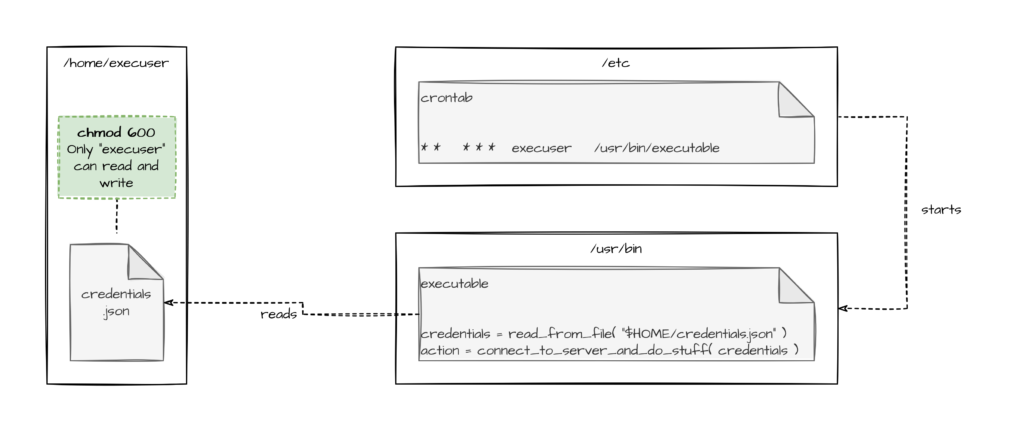
    Another use case would be cron jobs running on a server in a certain users context. Other users who can connect to the server should not be able to read the credentials that are used by the service:

    As always I hope this helps somebody and makes somebodies lives easier.